For the indie creator or the lean marketing team, the “honeymoon phase” with generative AI usually ends at the first project hand-off. It is one thing to generate a visually striking 1024×1024 square image for a Twitter thread; it is an entirely different challenge to produce a 3840px hero banner that doesn’t fall apart under the scrutiny of a 4K display.
The primary friction in modern AI media isn’t the speed of generation—it’s the technical gap between a low-resolution prompt and a high-fidelity, production-ready asset. Bridging this gap requires moving past the “slot machine” approach of random prompting and adopting a disciplined workflow. By leveraging the specific controls within Banana AI and its various model tiers, creators can move from “vibes” to assets that actually hold up on a professional landing page.
The Resolution Gap in Modern Ad Creative
The standard output of most generative models tops out at 1024 pixels on the longest side. On a standard mobile device, this looks crisp. However, as soon as that asset is stretched across a desktop hero section or used in a high-DPI print format, the “AI texture”—that subtle, painterly blurring—becomes an obvious marker of low quality.
Production-ready assets require K-level clarity. This isn’t just about pixel count; it’s about the integrity of edges and the lack of compression artifacts. In a performance marketing context, a blurry hero image can subconsciously signal a lack of brand authority to a prospective lead. The moment an indie maker moves from social media placeholders to high-conversion landing page assets, the resolution becomes a conversion risk.
Kimg AI addresses this by providing an environment where the initial generation is merely the “sketch.” The real work happens in the upscaling and refinement layers. Whether you are building a landing page for a SaaS launch or a set of display ads for a physical product, the goal is to maintain the “creative DNA” of the original prompt while forcing the resolution into a professional bracket.
Compositional Consistency via Nano Banana AI
One of the most significant wastes of resources in creative workflows is “credit burn”—using high-compute models for the messy, exploratory phase of design. This is where Nano Banana AI becomes a tactical advantage for the operator. Because it is optimized for speed and lower credit consumption, it functions as the “drafting board” for foundational themes.
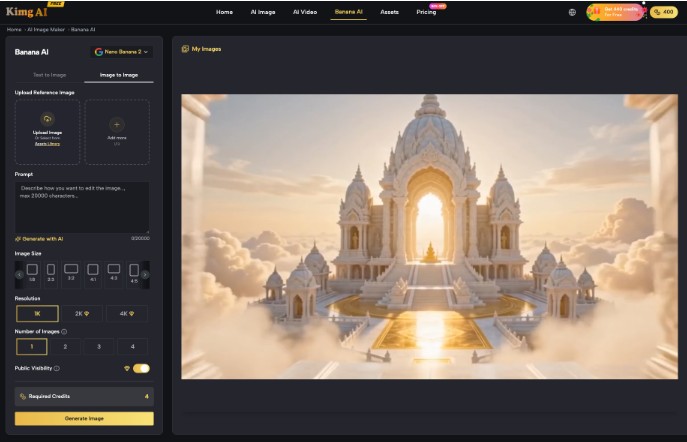
When building a campaign, you rarely need just one image. You need a 16:9 for YouTube, a 9:16 for TikTok, and a 1:1 for Instagram. To keep these visually coherent, the logic of Image-to-Image (Img2Img) workflows is essential. Instead of re-prompting from scratch for every aspect ratio, a creator can use a successful Nano Banana AI output as the structural “skeleton.”
By feeding the low-res social post back into the model as an image prompt, you maintain the composition—the placement of the horizon, the color palette, and the lighting—while varying the environment to fit new dimensions. This prevents the “brand drift” that happens when a creator tries to manually describe the same scene five different times across different tools.
The Workflow of a K-Level Transformation
Taking a concept from a 1K draft to a 4K asset is not a one-click process if you want to avoid “hallucinations”—those strange, extra limbs or warped textures that AI often adds during upscaling. A disciplined workflow usually follows three specific stages:
- Foundational Generation: Use Nano Banana AI to nail the composition and lighting. At this stage, you are looking for the right “bones,” not the final details.
- The Integrated Edit: Before a final upscale, use the Kimg AI integrated editor for inpainting and outpainting. If you need to turn a square social post into a widescreen hero banner, outpainting allows the AI to “imagine” the space to the left and right of the original frame. This ensures the focal point remains centered and the background remains seamless.
- Calculated Upscaling: Only once the composition is locked do you move to the Pro versions of the model for high-intent renders. This is where the Kimg AI upscaler pushes the image to K-level resolution, adding skin texture, fabric weaves, or metallic reflections that were absent in the Nano version.
It is worth noting that while these tools are powerful, there is an inherent uncertainty in how AI handles complex light refraction. For instance, if your campaign involves products made of glass or liquid, the upscaling process can sometimes create physically impossible reflections. Acknowledging this limitation is key; often, a quick manual touch-up in a traditional photo editor is still necessary to ensure the light follows the laws of physics before the asset goes live.
Managing Production Credits and Model Selection
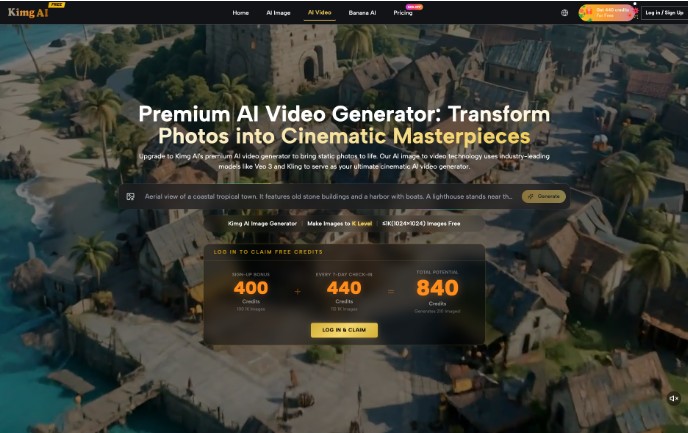
For indie makers running lean, efficiency is a metric. Kimg AI provides a sign-up bonus of 400 credits, with the potential to hit 840 credits through seven-day check-ins. In a production environment, these credits should be treated as a budget.
A common mistake is using heavy models like Flux or Grok for the entire creative process. While these models are excellent for initial ideation or complex prompt adherence, they can be credit-heavy. Banana AI is often the more pragmatic choice for controlled composition and repetitive asset production.
A smart operator allocates their 400-credit bonus toward testing different aspect ratios and “vibe checks” using Nano models. Once a winner is identified, they commit the higher-tier credits for the final render. This cost-per-asset approach allows an indie maker to run multiple performance marketing tests without exhausting their budget on the first three images.
The Uncertainty of Generative Branding
Despite the advancements in models like Nano Banana AI, we are still facing the “Last Mile” problem in generative branding. High-resolution outputs are great, but they are not a replacement for a graphic designer when it comes to text-heavy assets.
Currently, it cannot be safely concluded that any AI model can handle complex, embedded brand logos across varying textures without manual oversight. If you are generating a scene where your specific brand logo needs to appear on a laptop screen or a piece of clothing, the AI will likely “hallucinate” the typography or distort the brand marks.
Furthermore, the “K-level” upscaling process is an interpretive one. The AI is essentially guessing what those extra pixels should look like based on patterns it has seen before. This can occasionally introduce artifacts—subtle, repetitive patterns that don’t belong in the real world. Human oversight remains mandatory. You must review the upscaled asset at 100% zoom to ensure that a professional-looking landscape hasn’t accidentally gained a “digital thumbprint” of unwanted textures.
In the end, the value of tools like Kimg AI and the Banana AI model family isn’t in their ability to replace the creative process, but in their ability to compress the timeline between a concept and a production-ready asset. By using the right model for the right stage of the funnel—Nano for drafting, Banana Pro for the final render—creators can maintain the visual control required for high-stakes marketing.